



Knowledge Center
Je gezicht en hoofdbewegingen als joystick
Intro #

Voor virtual reality headsets is het de norm: de camera moet meebewegen met je hoofd!
Maar er zijn ook spellen zoals flight simulators waarbij als je meerdere monitors hebt, ook de camera naar rechts of links kan laten bewegen als je je hoofd iets draait, en wellicht zijn er nog andere leuke IOT toepassingen denkbaar.
Ik laat je zien aan de hand van wat voorbeelden hoe je zelf de data kan opvangen en kan gebruiken voor allerlei toepassingen.
Het enige wat je nodig hebt is een goed werkende camera/webcam voor de PC (en deze hoeft niet eens een model met een hoge resolutie te zijn!)
Definities VMC en OSC
OSC en VMC zijn niet hetzelfde protocol, maar ze worden vaak samen gebruikt in de context van virtual reality (VR) en motion capture, waarbij OSC (Open Sound Control naar andere applicaties, en VMC (Virtual Motion Capture Protocol) een specifiek formaat is om die bewegingsdata te structureren voor virtuele avatars. Kort gezegd: OSC is het vervoermiddel (protocol), en VMC is de taal/structuur van de boodschap (bewegingsdata).
VSeeFace #

Website: https://www.vseeface.icu/
About #
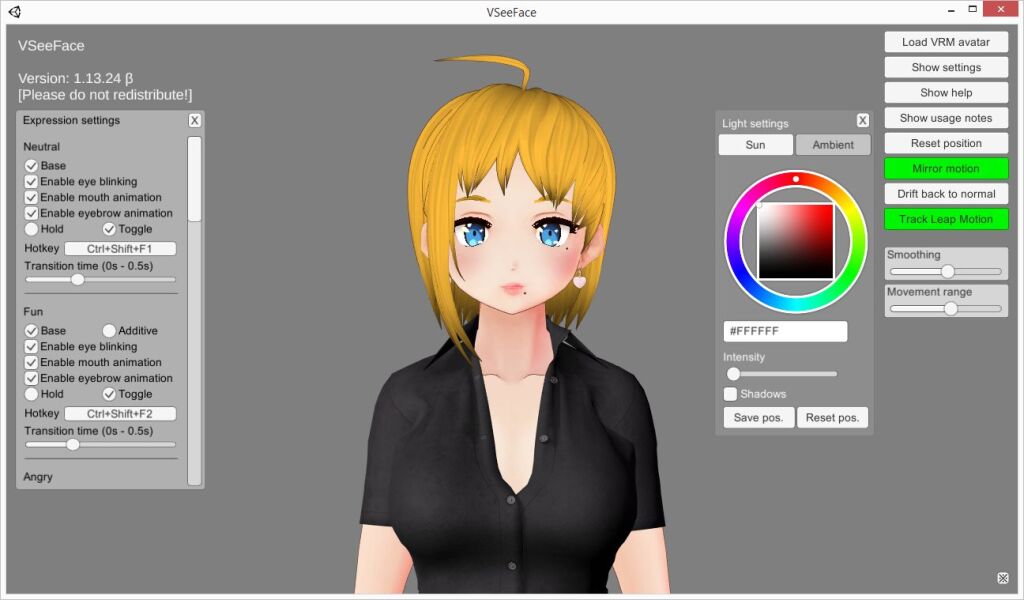
VSeeFace is a free, highly configurable face and hand tracking VRM and VSFAvatar avatar puppeteering program for virtual youtubers with a focus on robust tracking and high image quality. VSeeFace offers functionality similar to Luppet, 3tene, Wakaru and similar programs. VSeeFace runs on Windows 8 and above (64 bit only). Perfect sync is supported through iFacialMocap/FaceMotion3D/VTube Studio/MeowFace. VSeeFace can send, receive and combine tracking data using the VMC protocol, which also allows support for tracking through Virtual Motion Capture, Tracking World, Waidayo and more. Capturing with native transparency is supported through OBS’s game capture, Spout2 and a virtual camera.
Face tracking, including eye gaze, blink, eyebrow and mouth tracking, is done through a regular webcam.
For the optional hand tracking, a Leap Motion device is required. You can see a comparison of the face tracking performance compared to other popular vtuber applications here. In this comparison, VSeeFace is still listed under its former name OpenSeeFaceDemo.
Download: https://www.vseeface.icu/#download
Extra models / VRM avatars #
Vstreamer Live: https://vstreamer.live/vrm_avatars/
Vroid HUB: https://hub.vroid.com/en/models?is_other_users_available=1&is_downloadable=1
VMC data sturen over het netwerk #
Zodra je VSeeFace gestart hebt kan je je avatar al bewegen en wat dingen instellen, leuk om mee te spelen.
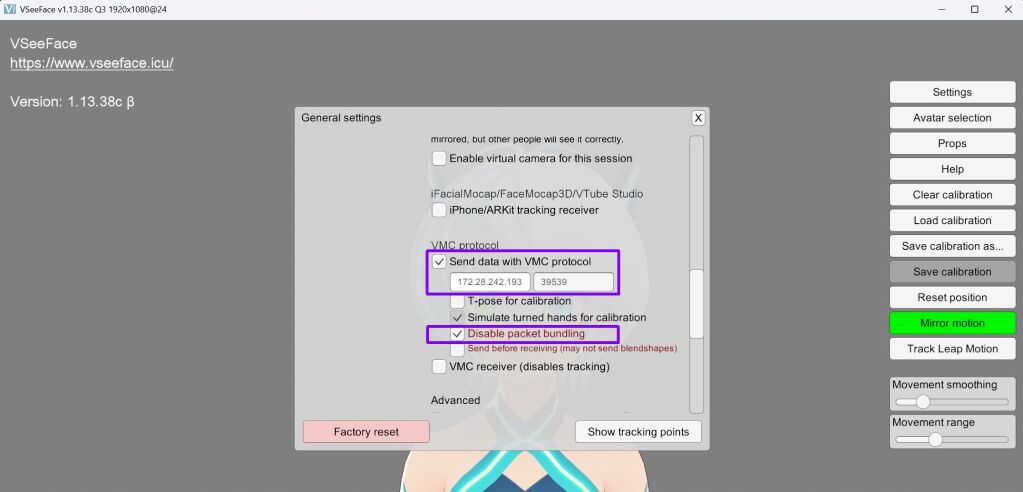
In general settings heb je de mogelijkheid om VMC (Virtual Motion Capture Protocol) data te versturen over het netwerk.
IP adres ontvanger
Standaard staat deze op localhost /127.0.0.1 maar omdat ik WSL (Linux in Windows) gebruik moest ik eerst even kijken welk IP adres Linux in WSL heeft gekregen.
In je WSL/Linux omgeving kan je ifconfig gebruiken (heb je dit niet, installeer deze met het commando:
sudo apt install net-tool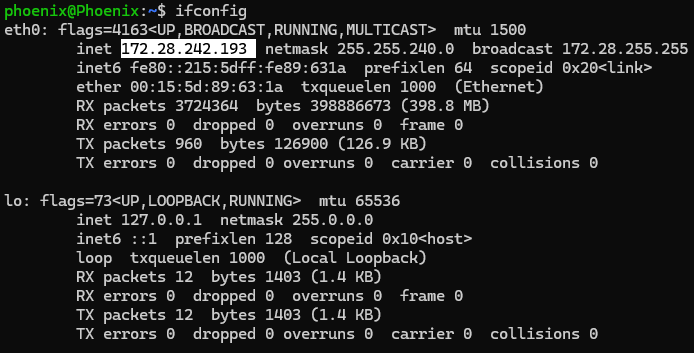
Mijn instellingen:
Anti stotteren #
Note: Belangrijk dat je “disable packet bundling” aanvinkt anders gaat de data stotteren (iets te maken met timestamps)
ChatGPT:
Het voelt contra-intuïtief, maar bij VMC → OSC → WSL/Node-RED/terminal is packet bundling vaak juist de oorzaak van stotteren.
Ik leg uit waarom dit gebeurt, specifiek in jouw setup.
Wat “packet bundling” bij VMC écht doet
Met packet bundling:
- Meerdere OSC messages (Head, Spine, handen, blendshapes, timing)
- worden samengevoegd in één OSC bundle
- en in één UDP-packet verstuurd per frame
Zonder bundling:
- Elke OSC message = apart UDP-packet
- Direct verzonden, zonder te wachten
OSC bundles hebben timestamps
Een OSC bundle bevat vaak:
#bundle <timetag>Veel OSC receivers (waaronder:
liblo/oscdumppython-osc- sommige Node-RED OSC nodes
respecteren die timetag en bufferen tot “het juiste moment”
Resultaat:
- micro-buffering
- bursts
- zichtbare jitter / hapering
Zonder bundling:
- geen timetags
- direct verwerken
- vloeiende realtime stream
VMC data ontvangen (Linux/WSL) #
Voor het afvangen van data of dumps bekijken hebben we nodig: oscdump
Dit kan je installeren met:
sudo apt install liblo-toolsGebruik dan het volgende commando met de poort uit VSeeFace:
oscdump 39539Na het uitvoeren van het commando zie je alle data binnenkomen:
ed0df827.36453d20 /VMC/Ext/Blend/Apply
ed0df827.3646cfc7 /VMC/Ext/OK i 1
ed0df827.364851a8 /VMC/Ext/T f 1876.182129
ed0df827.3a9c347e /VMC/Ext/Root/Pos sfffffff "root" 0.000000 0.000000 0.000000 -0.000000 -0.000000 -0.000000 1.000000
ed0df827.3a9f2777 /VMC/Ext/Bone/Pos sfffffff "Hips" 0.021847 0.961528 -0.000610 0.000022 -0.007147 0.003264 -0.999969
ed0df827.3a9fbe76 /VMC/Ext/Bone/Pos sfffffff "LeftUpperLeg" -0.077122 -0.039575 -0.005617 -0.117631 -0.044141 -0.007795 0.992045
ed0df827.3aa19439 /VMC/Ext/Bone/Pos sfffffff "RightUpperLeg" 0.077122 -0.039575 -0.005617 -0.115590 0.033347 -0.016896 0.992593
ed0df827.3aa369fc /VMC/Ext/Bone/Pos sfffffff "LeftLowerLeg" 0.021304 -0.372145 -0.007411 0.214642 -0.009440 -0.022392 0.976390
ed0df827.3aa52ef8 /VMC/Ext/Bone/Pos sfffffff "RightLowerLeg" -0.021304 -0.372145 -0.007410 0.210198 0.009573 0.021522 0.977375
ed0df827.3aa704bb /VMC/Ext/Bone/Pos sfffffff "LeftFoot" 0.010763 -0.430248 -0.022852 -0.098653 0.050201 0.023168 0.993585
ed0df827.3aa79bba /VMC/Ext/Bone/Pos sfffffff "RightFoot" -0.010764 -0.430248 -0.022853 -0.096631 -0.048029 0.007225 0.994135
ed0df827.3aa832b9 /VMC/Ext/Bone/Pos sfffffff "Spine" -0.000000 0.052914 0.009825 -0.000061 0.002351 -0.001188 0.999997
ed0df827.3aa9f7b5 /VMC/Ext/Bone/Pos sfffffff "Chest" -0.000000 0.113988 0.014169 0.017713 0.001880 -0.004935 0.999829
ed0df827.3aabcd78 /VMC/Ext/Bone/Pos sfffffff "Neck" 0.000000 0.114615 -0.033396 0.093070 0.157361 -0.138073 0.973402
ed0df827.3aac53b0 /VMC/Ext/Bone/Pos sfffffff "Head" -0.000000 0.074554 0.009350 0.001089 0.141268 -0.012277 0.989895
ed0df827.3aacc921 /VMC/Ext/Bone/Pos sfffffff "LeftShoulder" -0.022386 0.087264 -0.027443 -0.000000 0.000000 -0.000000 1.000000
ed0df827.3aae6c8f /VMC/Ext/Bone/Pos sfffffff "RightShoulder" 0.022386 0.087269 -0.027443 0.000000 -0.000000 -0.000000 1.000000
ed0df827.3aaef2c6 /VMC/Ext/Bone/Pos sfffffff "LeftUpperArm" -0.086295 -0.014869 0.005364 0.067337 0.071728 0.632379 0.768386
ed0df827.3aaf89c5 /VMC/Ext/Bone/Pos sfffffff "RightUpperArm" 0.086294 -0.014870 0.005364 0.067332 -0.071724 -0.632379 0.768387
ed0df827.3ab12d33 /VMC/Ext/Bone/Pos sfffffff "LeftLowerArm" -0.219007 -0.010198 0.001837 -0.086861 -0.004252 0.000016 0.996211
ed0df827.3ab302f6 /VMC/Ext/Bone/Pos sfffffff "RightLowerArm" 0.219011 -0.010201 0.001838 -0.086863 0.004252 -0.000017 0.996211
ed0df827.3ab4b72c /VMC/Ext/Bone/Pos sfffffff "LeftHand" -0.213574 -0.000466 0.017630 -0.003320 -0.000010 0.000519 0.999994
ed0df827.3ab54e2a /VMC/Ext/Bone/Pos sfffffff "RightHand" 0.213573 -0.000464 0.017630 -0.003311 0.000010 -0.000518 0.999994
ed0df827.3ab6f198 /VMC/Ext/Bone/Pos sfffffff "LeftToes" -0.001417 -0.064991 0.110508 -0.000000 -0.000000 -0.000000 1.000000
ed0df827.3ab8c75c /VMC/Ext/Bone/Pos sfffffff "RightToes" 0.001416 -0.064991 0.110508 -0.000000 -0.000000 -0.000000 1.000000
ed0df827.3aba9d1f /VMC/Ext/Bone/Pos sfffffff "LeftEye" -0.021665 0.064535 0.028409 -0.008687 -0.012262 0.000107 -0.999887
ed0df827.3abc9470 /VMC/Ext/Bone/Pos sfffffff "RightEye" 0.021665 0.064535 0.028409 -0.008686 -0.019885 0.000173 -0.999765
ed0df827.3abd6e8a /VMC/Ext/Bone/Pos sfffffff "LeftThumbProximal" -0.002032 -0.006912 0.017734 0.004358 -0.012511 0.102935 0.994600
ed0df827.3abe0589 /VMC/Ext/Bone/Pos sfffffff "LeftThumbIntermediate" -0.032287 -0.002701 0.033401 -0.006405 -0.056449 0.003764 0.998378
ed0df827.3abffcda /VMC/Ext/Bone/Pos sfffffff "LeftThumbDistal" -0.021324 -0.001512 0.019035 -0.000348 -0.188633 0.000204 0.982047
ed0df827.3ac1d29d /VMC/Ext/Bone/Pos sfffffff "LeftIndexProximal" -0.063906 0.005562 0.021442 -0.001489 0.009050 0.198775 0.980002
ed0df827.3ac29bf1 /VMC/Ext/Bone/Pos sfffffff "LeftIndexIntermediate" -0.032821 -0.000134 0.005149 -0.020930 -0.007685 0.120169 0.992503
ed0df827.3ac43f5f /VMC/Ext/Bone/Pos sfffffff "LeftIndexDistal" -0.020313 -0.000674 0.002301 -0.013854 -0.005087 0.186893 0.982270
ed0df827.3ac6045b /VMC/Ext/Bone/Pos sfffffff "LeftMiddleProximal" -0.066112 0.008373 0.004780 -0.003394 0.002573 0.147781 0.989011
ed0df827.3ac7c957 /VMC/Ext/Bone/Pos sfffffff "LeftMiddleIntermediate" -0.036901 -0.001349 0.002438 -0.008090 -0.003656 0.100802 0.994867
ed0df827.3ac96cc5 /VMC/Ext/Bone/Pos sfffffff "LeftMiddleDistal" -0.022683 -0.002405 0.000937 -0.005097 -0.002303 0.181193 0.983432
ed0df827.3aca2552 /VMC/Ext/Bone/Pos sfffffff "LeftRingProximal" -0.066681 0.008306 -0.010961 -0.008730 0.000260 0.186179 0.982477
ed0df827.3aca9ac3 /VMC/Ext/Bone/Pos sfffffff "LeftRingIntermediate" -0.034323 -0.000538 0.000172 -0.002416 -0.000704 0.116649 0.993170
ed0df827.3acaff6c /VMC/Ext/Bone/Pos sfffffff "LeftRingDistal" -0.019796 0.000700 0.000249 -0.001026 -0.000299 0.231421 0.972853
ed0df827.3acb6416 /VMC/Ext/Bone/Pos sfffffff "LeftLittleProximal" -0.063261 0.003125 -0.026794 -0.015907 0.000033 0.188725 0.981901
ed0df827.3acce5f7 /VMC/Ext/Bone/Pos sfffffff "LeftLittleIntermediate" -0.031398 -0.000273 0.000022 0.008902 0.002571 0.139841 0.990131
ed0df827.3acd6c2e /VMC/Ext/Bone/Pos sfffffff "LeftLittleDistal" -0.018059 0.000679 -0.000943 0.008107 0.002341 0.155745 0.987761
ed0df827.3ace032d /VMC/Ext/Bone/Pos sfffffff "RightThumbProximal" 0.002032 -0.006912 0.017734 0.004314 0.012521 -0.102992 0.994594
ed0df827.3ace8965 /VMC/Ext/Bone/Pos sfffffff "RightThumbIntermediate" 0.032277 -0.002678 0.033413 -0.006348 0.056445 -0.003733 0.998379
ed0df827.3aceee0f /VMC/Ext/Bone/Pos sfffffff "RightThumbDistal" 0.021319 -0.001499 0.019041 -0.000345 0.188633 -0.000203 0.982048
ed0df827.3ad06fef /VMC/Ext/Bone/Pos sfffffff "RightIndexProximal" 0.063906 0.005562 0.021443 -0.001490 -0.009051 -0.198775 0.980002
ed0df827.3ad0f626 /VMC/Ext/Bone/Pos sfffffff "RightIndexIntermediate" 0.032821 -0.000134 0.005149 -0.020931 0.007686 -0.120169 0.992503
ed0df827.3ad16b97 /VMC/Ext/Bone/Pos sfffffff "RightIndexDistal" 0.020314 -0.000674 0.002302 -0.013855 0.005087 -0.186893 0.982269
ed0df827.3ad1d041 /VMC/Ext/Bone/Pos sfffffff "RightMiddleProximal" 0.066112 0.008373 0.004780 -0.003394 -0.002573 -0.147781 0.989011
ed0df827.3ad35221 /VMC/Ext/Bone/Pos sfffffff "RightMiddleIntermediate" 0.036901 -0.001349 0.002438 -0.008091 0.003656 -0.100802 0.994867
ed0df827.3ad3d859 /VMC/Ext/Bone/Pos sfffffff "RightMiddleDistal" 0.022683 -0.002405 0.000937 -0.005098 0.002303 -0.181193 0.983432
ed0df827.3ad58c8e /VMC/Ext/Bone/Pos sfffffff "RightRingProximal" 0.066681 0.008306 -0.010961 -0.008731 -0.000261 -0.186179 0.982477
ed0df827.3ad612c6 /VMC/Ext/Bone/Pos sfffffff "RightRingIntermediate" 0.034323 -0.000538 0.000173 -0.002418 0.000704 -0.116649 0.993170
ed0df827.3ad698fe /VMC/Ext/Bone/Pos sfffffff "RightRingDistal" 0.019797 0.000700 0.000249 -0.001027 0.000299 -0.231421 0.972853
ed0df827.3ad71f35 /VMC/Ext/Bone/Pos sfffffff "RightLittleProximal" 0.063261 0.003125 -0.026793 -0.015910 -0.000034 -0.188725 0.981901
ed0df827.3ad783df /VMC/Ext/Bone/Pos sfffffff "RightLittleIntermediate" 0.031398 -0.000273 0.000023 0.008897 -0.002570 -0.139841 0.990131
ed0df827.3ad93814 /VMC/Ext/Bone/Pos sfffffff "RightLittleDistal" 0.018059 0.000679 -0.000943 0.008103 -0.002340 -0.155745 0.987761
ed0df827.3ad9be4c /VMC/Ext/Bone/Pos sfffffff "UpperChest" 0.000000 0.127278 -0.013992 0.000000 -0.000000 0.000000 1.000000
ed0df827.3adb7281 /VMC/Ext/Tra/Pos sfffffff "Head" 0.053871 1.438930 0.005251 -0.128540 -0.306138 0.140668 -0.932722
ed0df827.3add377d /VMC/Ext/Tra/Pos sfffffff "Spine" 0.022333 1.014441 0.009208 0.000083 -0.009498 0.004451 -0.999945
ed0df827.3adf0d40 /VMC/Ext/Tra/Pos sfffffff "Pelvis" 0.021847 0.961528 -0.000610 0.000022 -0.007147 0.003264 -0.999969
ed0df827.3adfb506 /VMC/Ext/Tra/Pos sfffffff "LeftHand" -0.160906 0.905568 0.009955 -0.021343 -0.008650 -0.629034 -0.777037
ed0df827.3ae02a77 /VMC/Ext/Tra/Pos sfffffff "RightHand" 0.198866 0.898836 0.001703 -0.006753 -0.008768 0.643783 -0.765128
ed0df827.3ae0c176 /VMC/Ext/Tra/Pos sfffffff "LeftFoot" -0.047093 0.141155 -0.030557 0.000001 -0.000208 0.000000 -1.000000
ed0df827.3ae1261f /VMC/Ext/Tra/Pos sfffffff "RightFoot" 0.043027 0.141155 -0.030558 0.000000 0.000209 0.000000 -1.000000
ed0df827.3ae5abc0 /VMC/Ext/Blend/Val sf "Neutral" 1.000000
ed0df827.3ae67514 /VMC/Ext/Blend/Val sf "A" 0.000000
ed0df827.3ae6c8f7 /VMC/Ext/Blend/Val sf "I" 0.000000
ed0df827.3ae71cd9 /VMC/Ext/Blend/Val sf "U" 0.000000
ed0df827.3ae770bc /VMC/Ext/Blend/Val sf "E" 0.000000
ed0df827.3ae7d566 /VMC/Ext/Blend/Val sf "O" 0.000000
ed0df827.3ae978d4 /VMC/Ext/Blend/Val sf "Blink" 0.916769
ed0df827.3ae9ee45 /VMC/Ext/Blend/Val sf "Blink_L" 0.000000
ed0df827.3aeb7025 /VMC/Ext/Blend/Val sf "Blink_R" 0.000000
ed0df827.3aed02cc /VMC/Ext/Blend/Val sf "Angry" 0.000000
ed0df827.3aeea63b /VMC/Ext/Blend/Val sf "Fun" 0.000000
ed0df827.3af0281b /VMC/Ext/Blend/Val sf "Joy" 0.000000
ed0df827.3af09d8c /VMC/Ext/Blend/Val sf "Sorrow" 0.000000
ed0df827.3af21f6c /VMC/Ext/Blend/Val sf "Surprised" 0.000000
ed0df827.3af3a14c /VMC/Ext/Blend/Val sf "Extra" 0.000000
ed0df827.3af42784 /VMC/Ext/Blend/Val sf "LookUp" 0.000000
ed0df827.3af5989d /VMC/Ext/Blend/Val sf "LookDown" 0.000000
ed0df827.3af5fd47 /VMC/Ext/Blend/Val sf "LookLeft" 0.000000
ed0df827.3af78fee /VMC/Ext/Blend/Val sf "LookRight" 0.000000
Filteren met GREP
Het is mogelijk om een filter te gebruiken met grep zoals het commando:
oscdump 39539 | grep -F '/VMC/Ext/Tra/Pos' | grep -F '"Head"'Output:
ed0df8ae.16642bf9 /VMC/Ext/Tra/Pos sfffffff "Head" 0.051239 1.449844 -0.058093 -0.157928 -0.116966 0.114305 -0.973813
ed0df8ae.1b8359bc /VMC/Ext/Tra/Pos sfffffff "Head" 0.051384 1.450683 -0.060050 -0.156156 -0.114357 0.112408 -0.974629
ed0df8ae.1fe0157e /VMC/Ext/Tra/Pos sfffffff "Head" 0.051067 1.450924 -0.060697 -0.155712 -0.111489 0.110550 -0.975245
ed0df8ae.2487fcb8 /VMC/Ext/Tra/Pos sfffffff "Head" 0.050450 1.450478 -0.059443 -0.156082 -0.110150 0.109506 -0.975456
ed0df8ae.29102bc7 /VMC/Ext/Tra/Pos sfffffff "Head" 0.049989 1.450173 -0.058580 -0.156319 -0.109022 0.108648 -0.975640
ed0df8ae.2dde15ca /VMC/Ext/Tra/Pos sfffffff "Head" 0.049753 1.450350 -0.058870 -0.155884 -0.107326 0.107250 -0.976053
ed0df8ae.3285fd04 /VMC/Ext/Tra/Pos sfffffff "Head" 0.049825 1.450937 -0.060089 -0.154900 -0.105910 0.105823 -0.976520
ed0df8ae.374b838b /VMC/Ext/Tra/Pos sfffffff "Head" 0.049871 1.451412 -0.061069 -0.154097 -0.104710 0.104627 -0.976905
ed0df8ae.3bf5e84e /VMC/Ext/Tra/Pos sfffffff "Head" 0.049627 1.451617 -0.061067 -0.152767 -0.102896 0.102378 -0.977545
ed0df8ae.4113d74d /VMC/Ext/Tra/Pos sfffffff "Head" 0.049152 1.451560 -0.060073 -0.150812 -0.100750 0.099180 -0.978401
ed0df8ae.45b8fde2 /VMC/Ext/Tra/Pos sfffffff "Head" 0.048781 1.451528 -0.059325 -0.149260 -0.099044 0.096654 -0.979066
ed0df8ae.4a7be553 /VMC/Ext/Tra/Pos sfffffff "Head" 0.048438 1.451314 -0.058196 -0.147965 -0.097873 0.095218 -0.979521
ed0df8ae.4ebabead /VMC/Ext/Tra/Pos sfffffff "Head" 0.048143 1.450798 -0.056444 -0.147185 -0.097683 0.095435 -0.979636
ed0df8ae.53854045 /VMC/Ext/Tra/Pos sfffffff "Head" 0.047877 1.450348 -0.054889 -0.146471 -0.097485 0.095585 -0.979748
ed0df8ae.589d0635 /VMC/Ext/Tra/Pos sfffffff "Head" 0.047784 1.449944 -0.053393 -0.146098 -0.098461 0.095541 -0.979711
ed0df8ae.5d4152b0 /VMC/Ext/Tra/Pos sfffffff "Head" 0.047942 1.449538 -0.051945 -0.146404 -0.101166 0.095869 -0.979358
ed0df8ae.6203f705 /VMC/Ext/Tra/Pos sfffffff "Head" 0.048321 1.448473 -0.047894 -0.146967 -0.109553 0.097285 -0.978230
ed0df8ae.66b1b36b /VMC/Ext/Tra/Pos sfffffff "Head" 0.049128 1.446550 -0.040168 -0.148190 -0.126523 0.100344 -0.975686
VMC data ontvangen (Python) #
Met het volgende python script kan je VMC/OSC data afvangen, dit loopt veel soepeler dan GREP!
Jet het wel de OSC bibliotheek nodig, installeer deze (in je venv / “source venv/bin/activate”) met:
pip install python-oscNote: het onderstaande script geeft alleen “head” data weer, dit kan men zelf aanpassen.
<strong>vmc_head.py</strong>
from pythonosc.dispatcher import Dispatcher
from pythonosc.osc_server import BlockingOSCUDPServer

PORT = 39539
ONLY_NAME = "Head"

def tra_pos(address, name, x, y, z, qx, qy, qz, qw):
    if name != ONLY_NAME:
        return
    # Compact output
    print(f'{name}: pos=({x:.3f},{y:.3f},{z:.3f}) quat=({qx:.3f},{qy:.3f},{qz:.3f},{qw:.3f})')

disp = Dispatcher()
disp.map("/VMC/Ext/Tra/Pos", tra_pos)

server = BlockingOSCUDPServer(("0.0.0.0", PORT), disp)
print(f"Listening VMC on 0.0.0.0:{PORT} (filter: {ONLY_NAME})")
server.serve_forever()
Nadat je het script start zie je de data op de console:
Listening VMC on 0.0.0.0:39539 (filter: Head)
Head: pos=(0.050,1.434,0.005) quat=(-0.133,-0.318,0.161,-0.925)
Head: pos=(0.050,1.434,0.006) quat=(-0.133,-0.317,0.161,-0.925)
Head: pos=(0.050,1.434,0.005) quat=(-0.133,-0.318,0.162,-0.925)
Head: pos=(0.050,1.434,0.005) quat=(-0.133,-0.319,0.163,-0.924)
Head: pos=(0.050,1.434,0.005) quat=(-0.132,-0.319,0.162,-0.924)
Head: pos=(0.051,1.434,0.005) quat=(-0.132,-0.320,0.162,-0.924)
Head: pos=(0.051,1.435,0.004) quat=(-0.131,-0.321,0.161,-0.924)
Head: pos=(0.051,1.435,0.004) quat=(-0.130,-0.321,0.161,-0.924)
Head: pos=(0.051,1.435,0.004) quat=(-0.129,-0.322,0.161,-0.924)
Head: pos=(0.051,1.435,0.004) quat=(-0.128,-0.322,0.161,-0.924)
Head: pos=(0.051,1.435,0.004) quat=(-0.127,-0.322,0.161,-0.924)
Head: pos=(0.051,1.435,0.005) quat=(-0.128,-0.323,0.161,-0.924)
Head: pos=(0.050,1.435,0.005) quat=(-0.129,-0.323,0.161,-0.924)
Head: pos=(0.050,1.435,0.005) quat=(-0.130,-0.323,0.160,-0.923)
Head: pos=(0.051,1.435,0.005) quat=(-0.131,-0.323,0.160,-0.923)
Head: pos=(0.051,1.435,0.004) quat=(-0.132,-0.323,0.160,-0.923)
Head: pos=(0.051,1.435,0.004) quat=(-0.132,-0.323,0.160,-0.923)
Head: pos=(0.051,1.435,0.004) quat=(-0.131,-0.323,0.161,-0.923)
AITrack – Gezicht en hoofdbewegingen monitoren #
Website: https://github.com/AIRLegend/aitrack
AITrack is a 6-Degree of Freedom headtracker designed to work alongside Opentrack for its use in simulators/games.
AITrack uses its own tracking pipeline (based on neural networks) to estimate the user’s head position with respect to the webcam and then, streams it to Opentrack, which in turn, transmits it to your games.
- Hardware (IR LEDs, specific hardware…) free headtracking solution.
- Good performance under poor light conditions.
- Good detection with partial face occlusion (using glasses).
- Reasonable low CPU percentage consumption.
- Remote-running capability. You can use a second PC (for example, a laptop)to stream the tracking data to your main machine.
Download: https://github.com/AIRLegend/aitrack/tags
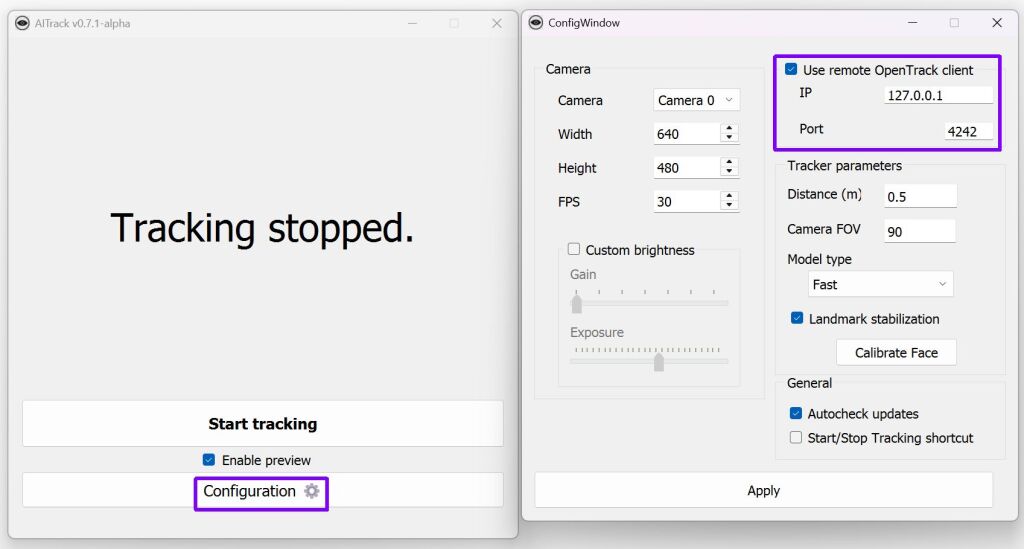
Nadat je AItrack hebt gestart kan je bij de instellingen “use remote OpenTrack client” aanvinken zodat je de data ontvangt in OpenTrack.
OpenTrack – Head rotation and transmitting #

Intro #
OpenTrack werkt samen met AItrack, Het ontvangt data van AItrack en zet de data om voor spelletjes en/of andere protocollen, ook kan je veel instellen zoals gevoeligheid (icm curves).
About #
opentrack is a program for tracking user’s head rotation and transmitting it to flight simulation software and military-themed video games. Project home is located at https://github.com/opentrack/opentrack.
For the latest downloads visit https://github.com/opentrack/opentrack/releases Download an .exe installer or a .7z archive. Currently installers and portable versions for Windows are available for each release. It supports USB stick truly “portable” installations
Please first refer to https://github.com/opentrack/opentrack/wiki for new user guide, frequent answers, specific tracker/filter documentation. See also the gameplay video with opentrack set up.
Usage #
opentrack is an application dedicated to tracking user’s head movements and relaying the information to games and flight simulation software.
opentrack allows for output shaping, filtering, and operating with many input and output devices and protocols; the codebase runs Microsoft Windows, Apple OSX (currently unmaintained), and GNU/Linux.
Don’t be afraid to submit an issue/feature request if you have any problems! We’re a friendly bunch.
Tracking input #
PointTracker by Patrick Ruoff, FreeTrack-like light points
Oculus Rift (Windows only)
Paper marker via the Aruco[1] library
Razer Hydra
Relaying via UDP from a different computer
Relaying UDP via the FreePIE[1] Android apps
Joystick analog axes (Windows)
Windows Phone tracker over opentrack UDP protocol
Arduino with custom Hatire firmware
Intel RealSense 3D camera (Windows)
BBC micro:bit, LEGO, sensortag support via Smalltalk(1)(2) S2Bot
Wiimote (Windows)
NeuralNet Tracker, AI-based head pose estimation with webcams.
Eyeware Beam[1]
Tobii eye tracker
XReal One[1] and probably XReal One Pro[2]glasses, see details here
Output protocols #
SimConnect for newer Microsoft Flight Simulator (Windows)
freetrack implementation (Windows)
Relaying UDP to another computer
Virtual joystick output (Windows, Linux, OSX)
Wine freetrack glue protocol (Linux, OSX)
X-Plane plugin (Linux; uses the Wine output option)
Tablet-like mouse output (Windows)
FlightGear
FSUIPC for Microsoft Flight Simulator 2002/2004 (Windows)
SteamVR through a bridge (Windows; see https://github.com/r57zone/OpenVR-OpenTrack by @r57zone)
OpenTrack – Input instellen #
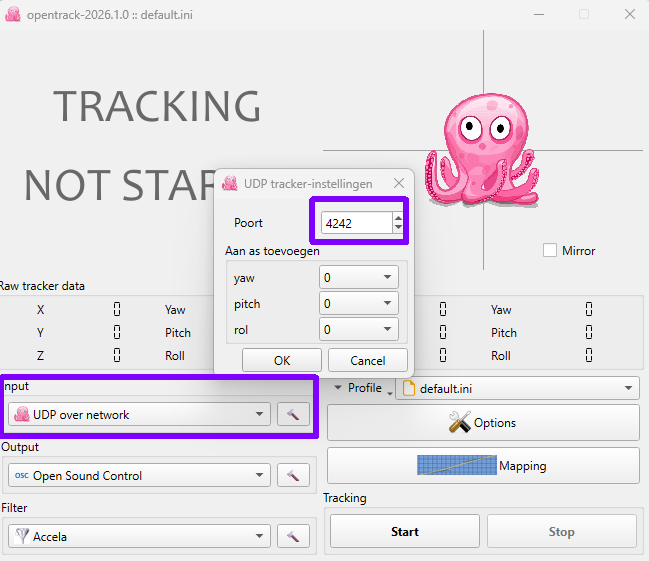
Nadat je Opentrack hebt gestart, klik op het hamertje bij de input en controleer of de instellingen juist zijn. De poort moet hetzelfde is als in AItrack ingesteld staat (en draait op localhost)
OpenTrack – Output instellen #
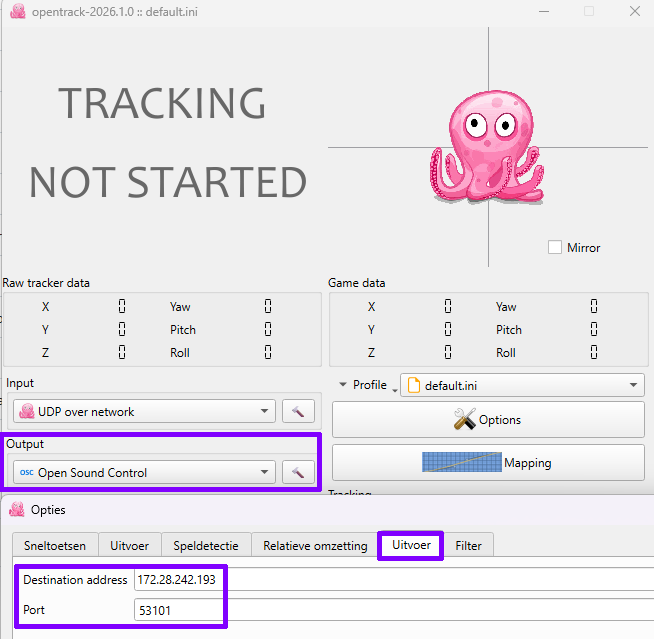
Om de data om te zetten naar OSC, selecteer “Open Sound Protocol” bij de output en klik daarna op het hamertje om deze te configureren.
Configureer daarbij de ontvanger (localhost/127.0.0.1) of een ander adres, zoals in mijn geval WSL op Windows.
OpenTrack – Data opvangen
Nadat je alles geconfigureerd hebt, kan je op “start” klikken, als het goed is komt er nu data binnen (als je je hoofd beweegt zie je de octopus ook bewegen):
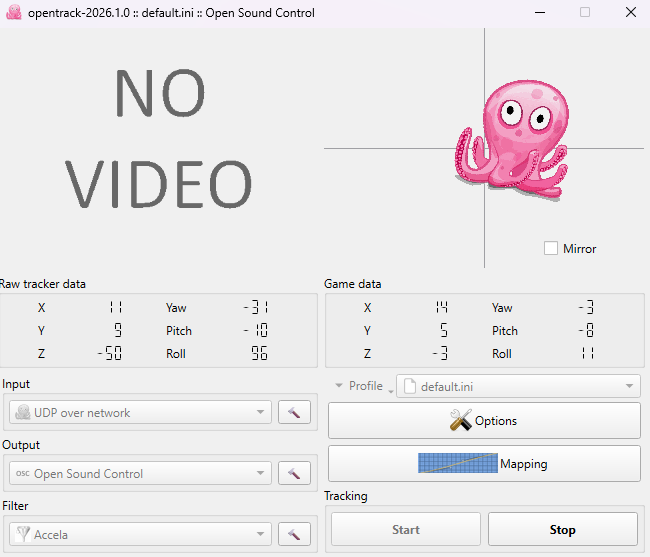
En in WSL kan je de data weer opvangen met het commando:
oscdump 53101output:
ed0e1679.f0a99b6e /bridge/quat ffff 0.961637 0.119795 0.240137 0.056905
ed0e1679.f1eb7456 /bridge/quat ffff 0.961417 0.120163 0.240821 0.056952
ed0e1679.f30c1332 /bridge/quat ffff 0.961232 0.120473 0.241394 0.056990
ed0e1679.f42d3846 /bridge/quat ffff 0.961056 0.120767 0.241940 0.057026
ed0e1679.f54d9406 /bridge/quat ffff 0.960887 0.121049 0.242462 0.057061
ed0e1679.f62a4db0 /bridge/quat ffff 0.960764 0.121253 0.242840 0.057085
ed0e1679.f794a6ea /bridge/quat ffff 0.960570 0.121576 0.243435 0.057124
ed0e1679.f8b599a9 /bridge/quat ffff 0.960425 0.121817 0.243881 0.057153
ed0e1679.f9d81f0f /bridge/quat ffff 0.960287 0.122047 0.244305 0.057179
ed0e1679.faf74cd2 /bridge/quat ffff 0.959743 0.122509 0.246172 0.057317
ed0e1679.fc1cb46a /bridge/quat ffff 0.959223 0.122949 0.247942 0.057446
ed0e1679.fd3836a7 /bridge/quat ffff 0.958735 0.123359 0.249590 0.057565
ed0e1679.fe1db876 /bridge/quat ffff 0.958363 0.123671 0.250841 0.057655
ed0e1679.ff854045 /bridge/quat ffff 0.957798 0.124144 0.252728 0.057788
ed0e167a.0083558a /bridge/quat ffff 0.957425 0.124454 0.253968 0.057875
ed0e167a.01eacc92 /bridge/quat ffff 0.956913 0.124878 0.255654 0.057992
ed0e167a.030728e9 /bridge/quat ffff 0.956533 0.125193 0.256902 0.058078
ed0e167a.03f06705 /bridge/quat ffff 0.956234 0.125439 0.257877 0.058145
ed0e167a.05151611 /bridge/quat ffff 0.955878 0.125732 0.259034 0.058223
ed0e167a.05f2fdb8 /bridge/quat ffff 0.955617 0.125946 0.259879 0.058280
ed0e167a.075ac8a3 /bridge/quat ffff 0.955210 0.126279 0.261192 0.058367
ed0e167a.087a17f4 /bridge/quat ffff 0.954499 0.126383 0.263730 0.058356
ed0e167a.0955d5f5 /bridge/quat ffff 0.953988 0.126457 0.265540 0.058348
ed0e167a.0ac16df3 /bridge/quat ffff 0.953182 0.126575 0.268365 0.058336
ed0e167a.0be0ef99 /bridge/quat ffff 0.952579 0.126663 0.270460 0.058326
ed0e167a.0cdbbe01 /bridge/quat ffff 0.952084 0.126735 0.272164 0.058318
Node-Red – Bewegingen opvangen #
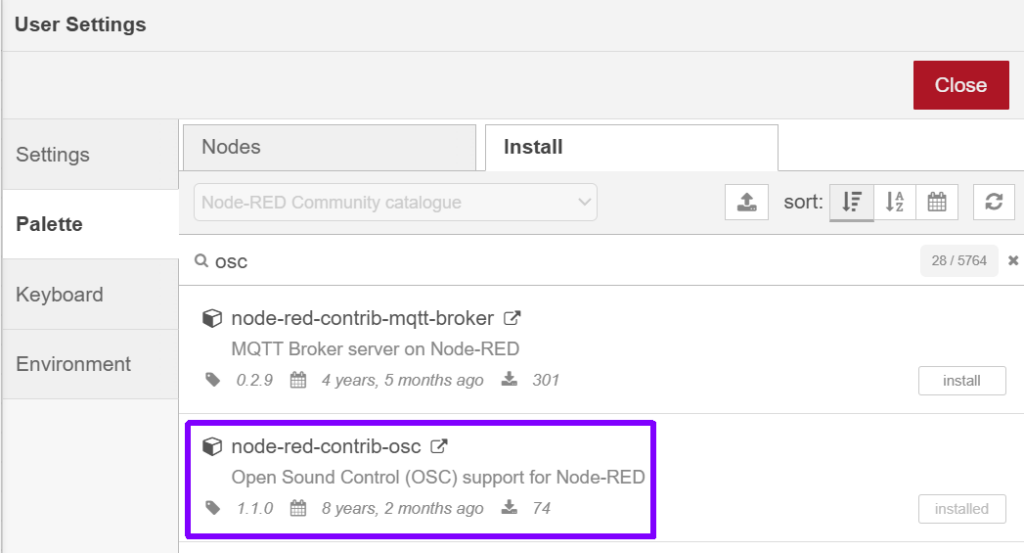
Om de data in Node-Red te ontvangen kan je de plugin/module node-red-contrib-osc installeren (via menu>pallette)
Bouw een flow met een UDP node ervoor zoals bijvoorbeeld:

[
    {
        "id": "f2c50c7136e49615",
        "type": "osc",
        "z": "9f0362def3debc08",
        "name": "",
        "path": "",
        "metadata": true,
        "x": 1010,
        "y": 320,
        "wires": [
            [
                "de7b916e101fbfe7"
            ]
        ]
    },
    {
        "id": "de7b916e101fbfe7",
        "type": "debug",
        "z": "9f0362def3debc08",
        "name": "debug 1",
        "active": true,
        "tosidebar": false,
        "console": false,
        "tostatus": true,
        "complete": "payload",
        "targetType": "msg",
        "statusVal": "payload",
        "statusType": "auto",
        "x": 1180,
        "y": 320,
        "wires": []
    },
    {
        "id": "28378454f73a41c2",
        "type": "udp in",
        "z": "9f0362def3debc08",
        "name": "",
        "iface": "",
        "port": "53101",
        "ipv": "udp4",
        "multicast": "false",
        "group": "",
        "datatype": "buffer",
        "x": 820,
        "y": 320,
        "wires": [
            [
                "f2c50c7136e49615"
            ]
        ]
    }
]
Daarachter kan je dan functies zetten om e.e.a. verder uit te filteren!
Hieronder een extended flow, maar op een Orange Pi gaaf dit heel veel bufferstress, de kleine computer kon het niet bijhouden. Gebruik een computer die snel genoeg is en je kan hiermee leuke dingen doen!
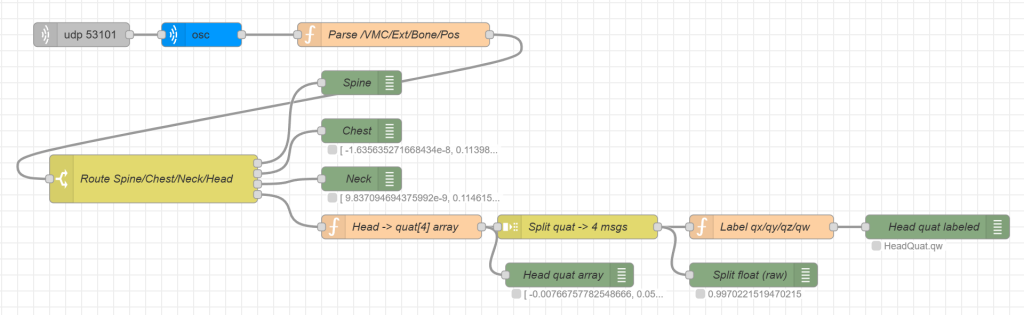
[
    {
        "id": "f2c50c7136e49615",
        "type": "osc",
        "z": "9f0362def3debc08",
        "name": "",
        "path": "",
        "metadata": false,
        "x": 270,
        "y": 80,
        "wires": [
            [
                "5fb5b058a2d6ab29"
            ]
        ]
    },
    {
        "id": "28378454f73a41c2",
        "type": "udp in",
        "z": "9f0362def3debc08",
        "name": "",
        "iface": "",
        "port": "53101",
        "ipv": "udp4",
        "multicast": "false",
        "group": "",
        "datatype": "buffer",
        "x": 120,
        "y": 80,
        "wires": [
            [
                "f2c50c7136e49615"
            ]
        ]
    },
    {
        "id": "5fb5b058a2d6ab29",
        "type": "function",
        "z": "9f0362def3debc08",
        "name": "Parse /VMC/Ext/Bone/Pos",
        "func": "// Verwacht:\n// msg.topic = \"/VMC/Ext/Bone/Pos\"\n// msg.payload = [\"BoneName\", x,y,z, qx,qy,qz,qw]\n\nif (msg.topic !== \"/VMC/Ext/Bone/Pos\") return null;\nif (!Array.isArray(msg.payload) || msg.payload.length < 8) return null;\n\nconst bone = String(msg.payload[0]);\n\nmsg.payload = {\n  path: msg.topic,\n  bone,\n  pos: [\n    Number(msg.payload[1]),\n    Number(msg.payload[2]),\n    Number(msg.payload[3])\n  ],\n  quat: [\n    Number(msg.payload[4]),\n    Number(msg.payload[5]),\n    Number(msg.payload[6]),\n    Number(msg.payload[7])\n  ]\n};\n\nmsg.topic = bone;   // handig voor switch/route\nreturn msg;",
        "outputs": 1,
        "timeout": "",
        "noerr": 0,
        "initialize": "",
        "finalize": "",
        "libs": [],
        "x": 510,
        "y": 80,
        "wires": [
            [
                "5d0dad3fe1dbf265"
            ]
        ]
    },
    {
        "id": "5d0dad3fe1dbf265",
        "type": "switch",
        "z": "9f0362def3debc08",
        "name": "Route Spine/Chest/Neck/Head",
        "property": "payload.bone",
        "propertyType": "msg",
        "rules": [
            {
                "t": "eq",
                "v": "Spine",
                "vt": "str"
            },
            {
                "t": "eq",
                "v": "Chest",
                "vt": "str"
            },
            {
                "t": "eq",
                "v": "Neck",
                "vt": "str"
            },
            {
                "t": "eq",
                "v": "Head",
                "vt": "str"
            }
        ],
        "checkall": "true",
        "repair": false,
        "outputs": 4,
        "x": 210,
        "y": 260,
        "wires": [
            [
                "92f3c2d5c4b1d594"
            ],
            [
                "75aa101345aed722"
            ],
            [
                "fecdb553a48a3c5b"
            ],
            [
                "963a95c9e590f6e1"
            ]
        ]
    },
    {
        "id": "92f3c2d5c4b1d594",
        "type": "debug",
        "z": "9f0362def3debc08",
        "name": "Spine",
        "active": true,
        "tosidebar": false,
        "console": false,
        "tostatus": false,
        "complete": "payload",
        "targetType": "msg",
        "statusVal": "",
        "statusType": "auto",
        "x": 470,
        "y": 140,
        "wires": []
    },
    {
        "id": "75aa101345aed722",
        "type": "debug",
        "z": "9f0362def3debc08",
        "name": "Chest",
        "active": true,
        "tosidebar": false,
        "console": false,
        "tostatus": true,
        "complete": "payload",
        "targetType": "msg",
        "statusVal": "payload.pos",
        "statusType": "msg",
        "x": 470,
        "y": 200,
        "wires": []
    },
    {
        "id": "fecdb553a48a3c5b",
        "type": "debug",
        "z": "9f0362def3debc08",
        "name": "Neck",
        "active": true,
        "tosidebar": false,
        "console": false,
        "tostatus": true,
        "complete": "payload",
        "targetType": "msg",
        "statusVal": "payload.pos",
        "statusType": "msg",
        "x": 470,
        "y": 260,
        "wires": []
    },
    {
        "id": "963a95c9e590f6e1",
        "type": "function",
        "z": "9f0362def3debc08",
        "name": "Head -> quat[4] array",
        "func": "const q = msg.payload && msg.payload.quat;\nif (!Array.isArray(q) || q.length !== 4) return null;\n\nmsg.payload = q;          // [qx,qy,qz,qw]\nmsg.topic = \"HeadQuat\";\nreturn msg;",
        "outputs": 1,
        "timeout": "",
        "noerr": 0,
        "initialize": "",
        "finalize": "",
        "libs": [],
        "x": 520,
        "y": 320,
        "wires": [
            [
                "d44fc3cee5f2451b",
                "ac6496f77ecf289c"
            ]
        ]
    },
    {
        "id": "d44fc3cee5f2451b",
        "type": "split",
        "z": "9f0362def3debc08",
        "name": "Split quat -> 4 msgs",
        "splt": "\\n",
        "spltType": "str",
        "arraySplt": 1,
        "arraySpltType": "len",
        "stream": false,
        "addname": "",
        "x": 740,
        "y": 320,
        "wires": [
            [
                "c5af8e3c28f9d5c1",
                "6e2d0e71c89bb92d"
            ]
        ]
    },
    {
        "id": "c5af8e3c28f9d5c1",
        "type": "function",
        "z": "9f0362def3debc08",
        "name": "Label qx/qy/qz/qw",
        "func": "// Na split: msg.payload is 1 float.\n// msg.parts.index: 0..3\nconst names = ['qx','qy','qz','qw'];\nconst idx = (msg.parts && typeof msg.parts.index === 'number') ? msg.parts.index : -1;\nmsg.component = (idx >= 0 && idx < 4) ? names[idx] : 'q?';\nmsg.topic = 'HeadQuat.' + msg.component;\nreturn msg;",
        "outputs": 1,
        "noerr": 0,
        "initialize": "",
        "finalize": "",
        "libs": [],
        "x": 970,
        "y": 320,
        "wires": [
            [
                "984ae49886b9bea0"
            ]
        ]
    },
    {
        "id": "ac6496f77ecf289c",
        "type": "debug",
        "z": "9f0362def3debc08",
        "name": "Head quat array",
        "active": true,
        "tosidebar": false,
        "console": false,
        "tostatus": true,
        "complete": "payload",
        "targetType": "msg",
        "statusVal": "payload",
        "statusType": "auto",
        "x": 730,
        "y": 380,
        "wires": []
    },
    {
        "id": "6e2d0e71c89bb92d",
        "type": "debug",
        "z": "9f0362def3debc08",
        "name": "Split float (raw)",
        "active": false,
        "tosidebar": false,
        "console": false,
        "tostatus": true,
        "complete": "payload",
        "targetType": "msg",
        "statusVal": "payload",
        "statusType": "auto",
        "x": 960,
        "y": 380,
        "wires": []
    },
    {
        "id": "984ae49886b9bea0",
        "type": "debug",
        "z": "9f0362def3debc08",
        "name": "Head quat labeled",
        "active": true,
        "tosidebar": false,
        "console": false,
        "tostatus": true,
        "complete": "true",
        "targetType": "full",
        "statusVal": "topic",
        "statusType": "msg",
        "x": 1190,
        "y": 320,
        "wires": []
    }
]