



Knowledge Center
nVidia Jetson NANO – Prepare for AI tools and LLM
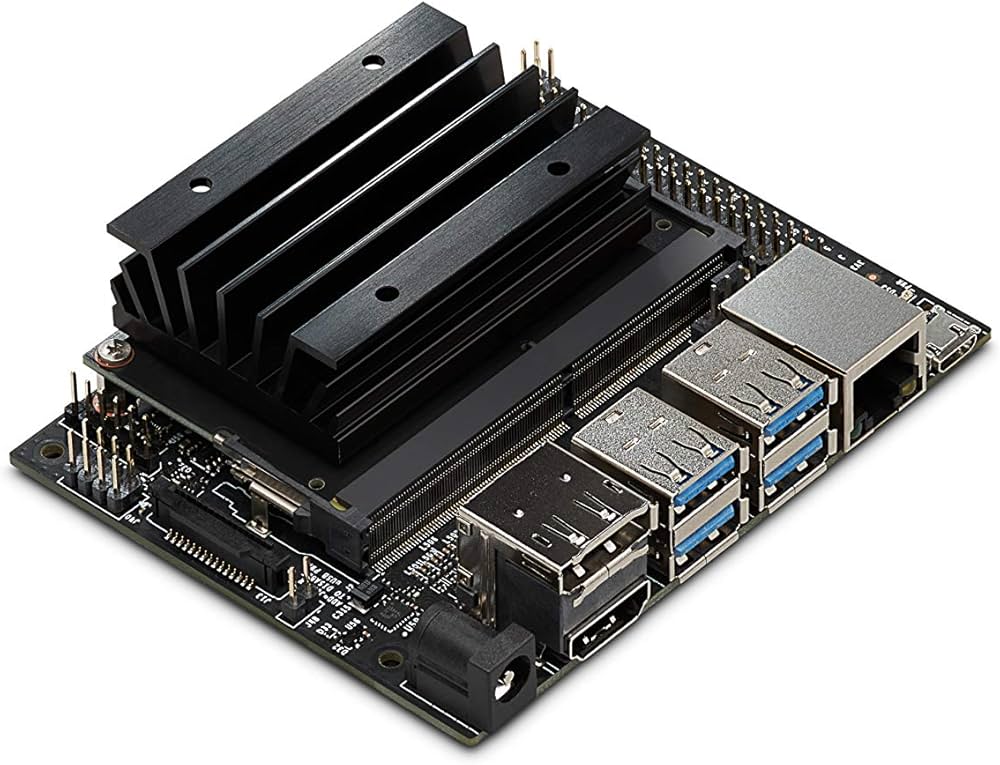
Official image with UI #
You can download Jetson IMG files wich you can burn on a SD card here: https://developer.nvidia.com/embedded/downloads/
Search for “Jetson Nano Developer Kit SD Card Image“:
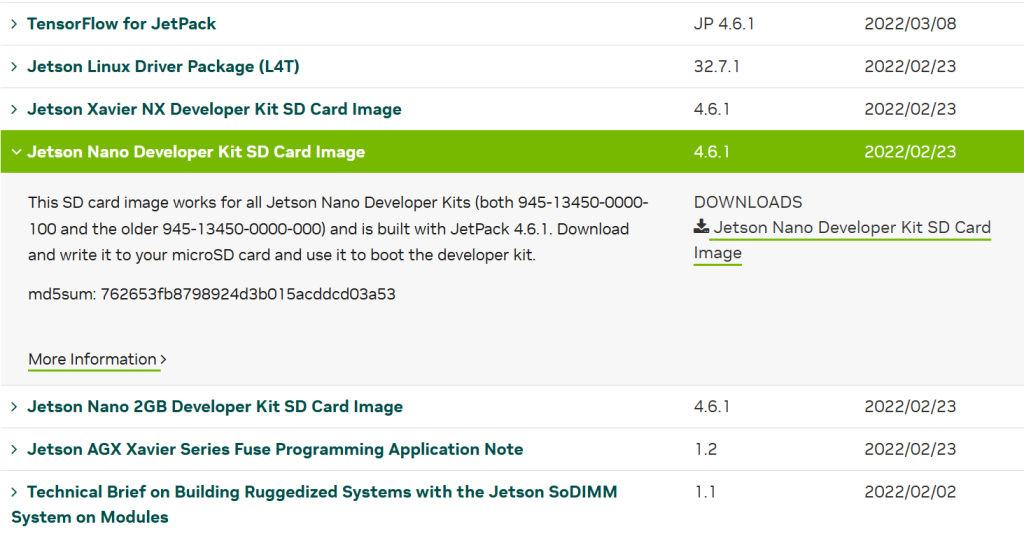
or always the latest version:
https://developer.nvidia.com/jetson-nano-sd-card-image
Prepare software with APT #
Install Python3, build tools, AI LLM libraries and dependancies:
sudo apt-get update && sudo apt-get install -y python3 python3-pip python3-venv python3-dev python3-skimage python3-packaging python3-tqdm python3-filelock python3-pil libopenblas-base libopenblas-dev libopenmpi-dev libomp-dev liblapack-dev libjpeg-dev libffi-dev libncurses5-dev libncursesw5-dev libreadline-dev libsqlite3-dev libgdbm-dev libdb5.3-dev libbz2-dev libexpat1-dev libssl-dev zlib1g-dev pkg-config gfortran nano curl git wget cmake build-essentialSet Python3 as default:
sudo update-alternatives --install /usr/bin/python python /usr/bin/python3 1Output:
update-alternatives: using /usr/bin/python3 to provide /usr/bin/python (python) in auto modeCheck with:
python --versionOutput:
Python 3.6.9Prepare software with PIP3 #
Install these modules thhrough the PIP system, them need compilation:
sudo -H pip3 install setuptools-rust importlib-metadata sacremoses // huggingface_hubUpdate the setuptools/wheel #
Ubuntu 18.04 has some old setuptools/wheel, update these with this command
sudo -H pip3 install --upgrade "setuptools<60" wheelOutput:
Collecting setuptools<60
  Downloading https://files.pythonhosted.org/packages/b0/3a/88b210db68e56854d0bcf4b38e165e03be377e13907746f825790f3df5bf/setuptools-59.6.0-py3-none-any.whl (952kB)
    100% |████████████████████████████████| 962kB 515kB/s
Collecting wheel
  Downloading https://files.pythonhosted.org/packages/27/d6/003e593296a85fd6ed616ed962795b2f87709c3eee2bca4f6d0fe55c6d00/wheel-0.37.1-py2.py3-none-any.whl
Installing collected packages: setuptools, wheel
  Found existing installation: setuptools 39.0.1
    Not uninstalling setuptools at /usr/lib/python3/dist-packages, outside environment /usr
  Found existing installation: wheel 0.30.0
    Not uninstalling wheel at /usr/lib/python3/dist-packages, outside environment /usr
Successfully installed setuptools-59.6.0 wheel-0.37.1
Rust programming language/compiler #
Rust is blazingly fast and memory-efficient: with no runtime or garbage collector, it can power performance-critical services, run on embedded devices, and easily integrate with other languages.
Some AI LLM libraries like safetensors and tokenizer need RUST to compile.
Install rust with this command:
curl https://sh.rustup.rs -sSf | shChoose 1
   default host triple: aarch64-unknown-linux-gnu
     default toolchain: stable (default)
               profile: default
  modify PATH variable: yes

1) Proceed with standard installation (default - just press enter)
2) Customize installation
3) Cancel installation
>1
Output:
info: profile set to 'default'
info: default host triple is aarch64-unknown-linux-gnu
info: syncing channel updates for 'stable-aarch64-unknown-linux-gnu'
info: latest update on 2025-10-30, rust version 1.91.0 (f8297e351 2025-10-28)
info: downloading component 'cargo'
info: downloading component 'clippy'
info: downloading component 'rust-docs'
 20.5 MiB /  20.5 MiB (100 %)  10.2 MiB/s in  2s
info: downloading component 'rust-std'
 27.0 MiB /  27.0 MiB (100 %)  10.1 MiB/s in  3s
info: downloading component 'rustc'
 58.3 MiB /  58.3 MiB (100 %)  10.1 MiB/s in  7s
info: downloading component 'rustfmt'
info: installing component 'cargo'
  9.7 MiB /   9.7 MiB (100 %)   6.8 MiB/s in  1s
info: installing component 'clippy'
info: installing component 'rust-docs'
 20.5 MiB /  20.5 MiB (100 %)   2.4 MiB/s in 12s
info: installing component 'rust-std'
 27.0 MiB /  27.0 MiB (100 %)   6.0 MiB/s in  8s
info: installing component 'rustc'
 58.3 MiB /  58.3 MiB (100 %)   5.5 MiB/s in 12s
info: installing component 'rustfmt'
info: default toolchain set to 'stable-aarch64-unknown-linux-gnu'

  stable-aarch64-unknown-linux-gnu installed - rustc 1.91.0 (f8297e351 2025-10-28)


Rust is installed now. Great!

To get started you may need to restart your current shell.
This would reload your PATH environment variable to include
Cargo's bin directory ($HOME/.cargo/bin).

To configure your current shell, you need to source
the corresponding env file under $HOME/.cargo.

This is usually done by running one of the following (note the leading DOT):
. "$HOME/.cargo/env"            # For sh/bash/zsh/ash/dash/pdksh
source "$HOME/.cargo/env.fish"  # For fish
source $"($nu.home-path)/.cargo/env.nu"  # For nushell
For compiling stuff later-on we need a specific version of rust (not to new) to compile succesfully, revert the version to 1.72.0
source $HOME/.cargo/env
rustup install 1.72.0
Set as default:
rustup default 1.72.0Output:
info: using existing install for '1.72.0-aarch64-unknown-linux-gnu'
info: default toolchain set to '1.72.0-aarch64-unknown-linux-gnu'

  1.72.0-aarch64-unknown-linux-gnu unchanged - rustc 1.72.0 (5680fa18f 2023-08-23)
Check:
rustc --versionOutput:
rustc 1.72.0 (5680fa18f 2023-08-23)OPTIONAL/NOTE: Manually installing and building RUST (takes a lot of time)
cd /tmp
wget https://static.rust-lang.org/dist/rust-1.72.0-aarch64-unknown-linux-gnu.tar.gz
tar -xzf rust-1.72.0-aarch64-unknown-linux-gnu.tar.gz
cd rust-1.72.0-aarch64-unknown-linux-gnu
sudo ./install.sh
Pytorch #

PyTorch is a Python package that provides two high-level features:
- Tensor computation (like NumPy) with strong GPU acceleration
- Deep neural networks built on a tape-based autograd system
You can reuse your favorite Python packages such as NumPy, SciPy, and Cython to extend PyTorch when needed.
There is a wheel installer (322MB) for pytoch, download it like this:
wget https://nvidia.box.com/shared/static/fjtbno0vpo676a25cgvuqc1wty0fkkg6.whl -O torch-1.10.0-cp36-cp36m-linux_aarch64.whlInstall the wheel:
sudo -H pip3 install torch-1.10.0-cp36-cp36m-linux_aarch64.whlOutput:
Processing ./torch-1.10.0-cp36-cp36m-linux_aarch64.whl
Collecting dataclasses; python_version < "3.7" (from torch==1.10.0)
  Downloading https://files.pythonhosted.org/packages/fe/ca/75fac5856ab5cfa51bbbcefa250182e50441074fdc3f803f6e76451fab43/dataclasses-0.8-py3-none-any.whl
Requirement already satisfied: typing-extensions in /usr/local/lib/python3.6/dist-packages (from torch==1.10.0)
Installing collected packages: dataclasses, torch
Successfully installed dataclasses-0.8 torch-1.10.0
Remove the downloaded wheel installer
sudo rm torch-1.10.0-cp36-cp36m-linux_aarch64.whlCheck for pytorch modules in python:
python - <<'EOF'
import torch
print("Torch version:", torch.__version__)
print("CUDA available:", torch.cuda.is_available())
print("GPU:", torch.cuda.get_device_name(0) if torch.cuda.is_available() else "-")
EOF
Expected output:
Torch version: 1.10.0
CUDA available: True
GPU name: NVIDIA Tegra X1
Prepare software with PIP3 – phase 2 #
Because this is an older device image we can only use the last supported versions on this hardware/OS, so install these modules with this command:
sudo -H pip3 install "Cython==0.29.36" "pyyaml==5.4.1" "numpy==1.19.5" "regex==2022.3.15" "accelerate==0.9.0"Install diffusers with no dependancies, otherwise the install will fail:
sudo -H pip3 install --no-deps "diffusers==0.3.0"//NOT WORKING Install safetensors (not as sudo, because RUST cannot be found as root) //NOT WORKING
pip3 install --user --no-cache-dir safetensors==0.2.8
Install Transformers with no dependancies, otherwise the install will fail:
sudo -H pip3 install --no-deps "transformers==4.18.0"Tokenizers #

Download tokenizers with git:
git clone https://github.com/huggingface/tokenizers.git ~/tokenizers-srcSet version to 0.12.0 on this older hardware/OS
cd ~/tokenizers-src
git checkout v0.12.0
Output:
Note: checking out 'v0.12.0'.

You are in 'detached HEAD' state. You can look around, make experimental
changes and commit them, and you can discard any commits you make in this
state without impacting any branches by performing another checkout.

If you want to create a new branch to retain commits you create, you may
do so (now or later) by using -b with the checkout command again. Example:

  git checkout -b <new-branch-name>

HEAD is now at 0eb7455f Preparing `0.12` release. (#967)
now we need to set base64ct to a specific version:
cd ~/tokenizers-src/tokenizers
cargo update -p base64ct --precise 1.7.3
Output:
    Updating crates.io index
    Updating crates.io index
 Downgrading base64ct v1.8.0 -> v1.7.3
note: pass `--verbose` to see 15 unchanged dependencies behind latest
Now let’s build, we need to set specific flags to ignore warnings otherwise the build will fail!:
cd ~/tokenizers-src/bindings/python
RUSTFLAGS="-A invalid_reference_casting" env "PATH=$HOME/.cargo/bin:$PATH" python3 setup.py build_rust --inplace
Test it with python on the commandline:
cd ~/
python3 -c "import tokenizers; print(tokenizers.__version__)"
Expected output:
0.12.0Remove source files:
cd ~/
sudo rm -rf tokenizers-src
Torchvision #

There is no ready-to-install version of torchvision for the Jetson NANO, so we have to build it.
Download torchvision 0.11.1 (1.22GB) that wil work with the hardware/OS with git:
cd ~/
git clone --branch v0.11.1 https://github.com/pytorch/vision.git
cd vision
make a nice map name like /usr/local/lib/python3.6/dist-packages/ like torchvision-0.11.1 set the build version with this command:
export BUILD_VERSION=0.11.1Build and install torchvision:
sudo -H pip3 install .Output:
Processing /home/jetson/vision
Requirement already satisfied: numpy in /usr/local/lib/python3.6/dist-packages (from torchvision==0.11.0a0+fa347eb)
Requirement already satisfied: torch in /usr/local/lib/python3.6/dist-packages (from torchvision==0.11.0a0+fa347eb)
Collecting pillow!=8.3.0,>=5.3.0 (from torchvision==0.11.0a0+fa347eb)
  Downloading https://files.pythonhosted.org/packages/7d/2a/2fc11b54e2742db06297f7fa7f420a0e3069fdcf0e4b57dfec33f0b08622/Pillow-8.4.0.tar.gz (49.4MB)
    100% |████████████████████████████████| 49.4MB 10kB/s
Requirement already satisfied: typing-extensions in /usr/local/lib/python3.6/dist-packages (from torch->torchvision==0.11.0a0+fa347eb)
Requirement already satisfied: dataclasses; python_version < "3.7" in /usr/local/lib/python3.6/dist-packages (from torch->torchvision==0.11.0a0+fa347eb)
Building wheels for collected packages: pillow
  Running setup.py bdist_wheel for pillow ... done
  Stored in directory: /root/.cache/pip/wheels/a7/69/9a/bba9fca6782340f88dbc378893095722a663cbc618e58fe401
Successfully built pillow
Installing collected packages: pillow, torchvision
  Found existing installation: Pillow 5.1.0
    Not uninstalling pillow at /usr/lib/python3/dist-packages, outside environment /usr
  Running setup.py install for torchvision ... done
Successfully installed pillow-8.4.0 torchvision-0.11.0a0+fa347eb
Test it with python on the commandline:
cd ~/
python3 -c "import torchvision; print(torchvision.__version__)"
Expected output:
0.11.0a0+fa347ebRemove source files:
cd ~/
sudo rm -rf vision
Upgrade tqdm #
Upgrade tqdm otherwise the module transformers will complain because the ‘auto’ function is missing in the old versions.
sudo -H pip3 install --upgrade "tqdm<5"Final test #
Final test on the command promt to see if everything is installed and can be loaded in python3:
python - <<'EOF'
import torch
import torchvision
import transformers
import tokenizers
print("Torch version:", torch.__version__)
print("TorchVision:", torchvision.__version__)
print("transformers:", transformers.__version__)
print("tokenizers:",tokenizers.__version__)
print("CUDA available:", torch.cuda.is_available())
print("GPU:", torch.cuda.get_device_name(0) if torch.cuda.is_available() else "-")
EOF
Expected output:
Torch: 1.10.0
Torchvision: 0.11.0a0+fa347eb
transformers: 4.18.0
tokenizers: 0.12.0
CUDA available: True
GPU: NVIDIA Tegra X1
Tokenizer benchmark #
Create a file called tokenizer_bench.py with the contents:
import time
import statistics
from transformers import GPT2Tokenizer, GPT2TokenizerFast

# aantal herhalingen per zin
RUNS = 200

SENTENCES = [
    "Hello Jetson Nano!",
    "Name the planets in our solar system.",
    "RS-485 communication with a REC BMS at 56000 baud.",
    "Tibber API query for priceInfo today and tomorrow.",
    "This is a slightly longer sentence to see how the tokenizer scales with length.",
]

print("Loading tokenizers...")
t0 = time.perf_counter()
tok_slow = GPT2Tokenizer.from_pretrained("gpt2")
t1 = time.perf_counter()
tok_fast = GPT2TokenizerFast.from_pretrained("gpt2")
t2 = time.perf_counter()

print(f"Loaded slow tokenizer in {(t1 - t0) * 1000:.1f} ms")
print(f"Loaded fast tokenizer in {(t2 - t1) * 1000:.1f} ms\n")


def percentile(data, p):
    if not data:
        return 0
    data = sorted(data)
    k = (len(data) - 1) * (p / 100)
    f = int(k)
    c = min(f + 1, len(data) - 1)
    if f == c:
        return data[int(k)]
    return data[f] + (data[c] - data[f]) * (k - f)


def bench_tokenizer(name, tokenizer, sentences, runs=RUNS):
    encode_times = []
    decode_times = []
    for _ in range(runs):
        for s in sentences:
            # encode
            t_start = time.perf_counter()
            ids = tokenizer.encode(s)
            t_end = time.perf_counter()
            encode_times.append((t_end - t_start) * 1000)

            # decode
            t_start = time.perf_counter()
            _ = tokenizer.decode(ids)
            t_end = time.perf_counter()
            decode_times.append((t_end - t_start) * 1000)

    avg_enc = statistics.mean(encode_times)
    p95_enc = percentile(encode_times, 95)
    avg_dec = statistics.mean(decode_times)
    p95_dec = percentile(decode_times, 95)

    print(f"=== {name} ===")
    print(f"encode: avg {avg_enc:.3f} ms | p95 {p95_enc:.3f} ms | samples {len(encode_times)}")
    print(f"decode: avg {avg_dec:.3f} ms | p95 {p95_dec:.3f} ms | samples {len(decode_times)}")
    print()


# 1) HF-tokenizers benchmarken
bench_tokenizer("HF GPT2Tokenizer (slow)", tok_slow, SENTENCES)
bench_tokenizer("HF GPT2TokenizerFast (rust)", tok_fast, SENTENCES)

# 2) jouw Rust-tokenizers-pakket benchmarken via from_pretrained
try:
    import sys
    sys.path.append("/usr/local/lib/python3.6/dist-packages/tokenizers-0.12.0-py3.6-linux-aarch64.egg")
    import tokenizers

    # 0.12.0 heeft Tokenizer.from_pretrained
    rust_tok = tokenizers.Tokenizer.from_pretrained("gpt2")

    class RustHFWrapper:
        def encode(self, text):
            # geeft Encoding terug → ids pakken
            return rust_tok.encode(text).ids

        def decode(self, ids):
            # rust-tokenizers decode verwacht list[int]
            return rust_tok.decode(ids)

    bench_tokenizer("Rust tokenizers (Tokenizer.from_pretrained('gpt2'))", RustHFWrapper(), SENTENCES)

except Exception as e:
    print("FOUT: kon jouw Rust-tokenizer niet benchmarken:", e)
Example output:
Loading tokenizers...
Loaded slow tokenizer in 1492.1 ms
Loaded fast tokenizer in 1638.5 ms

=== HF GPT2Tokenizer (slow) ===
encode: avg 0.823 ms | p95 0.898 ms | samples 3000
decode: avg 0.352 ms | p95 0.481 ms | samples 3000

=== HF GPT2TokenizerFast (rust) ===
encode: avg 0.335 ms | p95 0.360 ms | samples 3000
decode: avg 0.275 ms | p95 0.379 ms | samples 3000

=== Rust tokenizers (Tokenizer.from_pretrained('gpt2')) ===
encode: avg 0.123 ms | p95 0.140 ms | samples 3000
decode: avg 0.029 ms | p95 0.035 ms | samples 3000
As you can see our build GPT2 tokenizers are a lot faster!
Bonus – Install Python 3.8 also on the system as ALT install #
Python 3.8.18<br><br>wget https://www.python.org/ftp/python/3.8.18/Python-3.8.18.tgz<br>tar xzf Python-3.8.18.tgz<br>cd Python-3.8.18<br><br>./configure --enable-optimizations<br>make -j4<br>sudo make altinstall